
In August 2025, a new patch for QRadar 7.5.0, Update Package 13 (UP13), was published. You can find the official notes at: IBM Support – 7.5.0.13.
What’s New in UP13 (7.5.0.13)
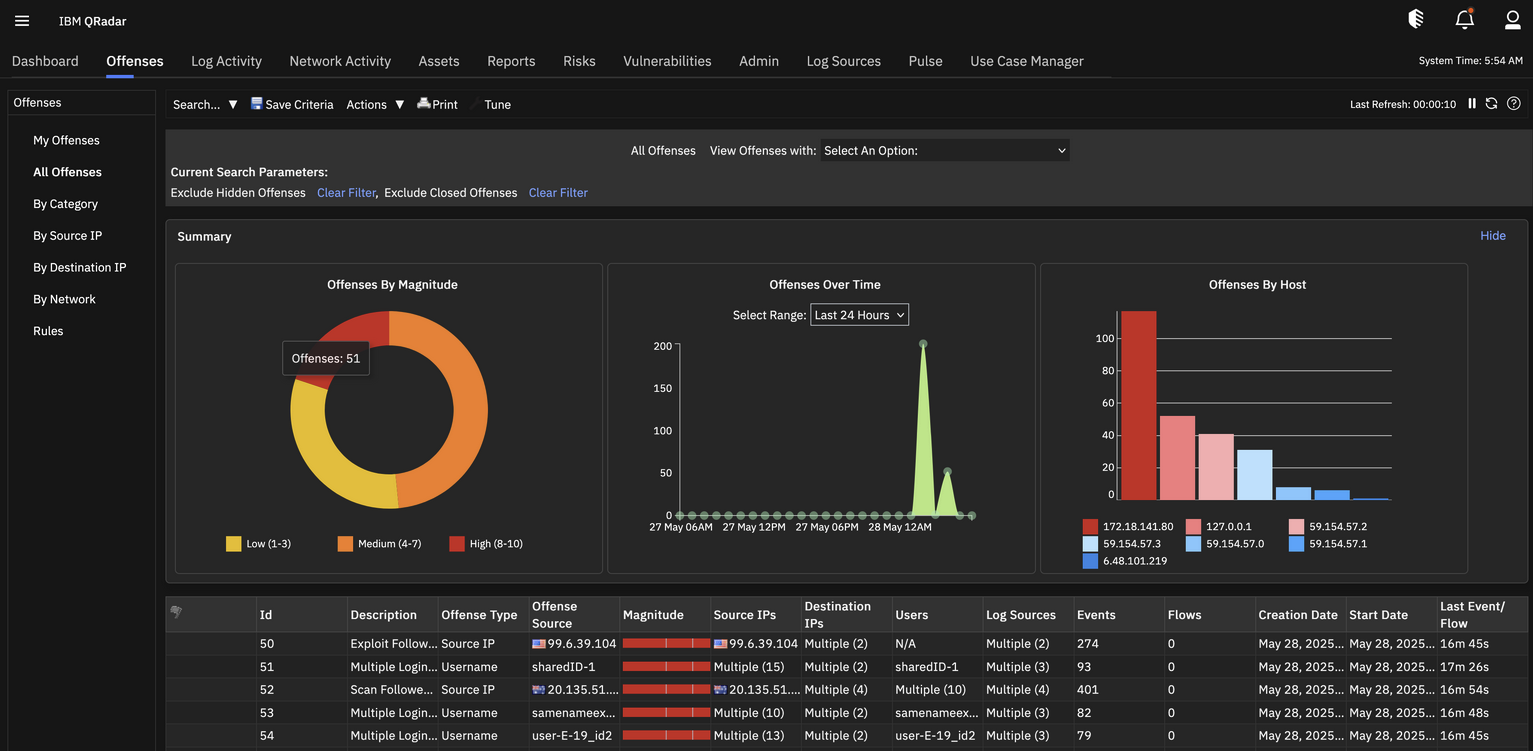
- Infographic-based visual summaries in the Offense tab (timeline, magnitude ranking, asset grouping) to speed triage and context building. See the screenshot below.
- Enhancements for failover and recovery in console/app scenarios, as well as large backups.
- Admin UX consistency across Store & Forward, Domains, Centralized Credentials, and Resource Restrictions.
- Regex & custom property improvements in parsing workflows.
- Search visibility improvements for partial results during long-running queries.
- DSM/collector updates and general reliability fixes.
Infographic Visualization: Screenshot & Analysis
Pros
- Immediate situational awareness: timelines and rankings surface patterns and peaks quickly.
- Prioritization: magnitude/severity visuals steer focus to the highest-impact offenses.
- Asset visibility: host/asset grouping helps spotlight affected systems fast.
Cons
- Screen real estate: can crowd table columns and analyst workflows on smaller displays.
- Inflexibility (current state): limited native controls to hide/toggle or customize the panel.
- Early rollout friction: feedback indicates desire for per-user/per-role preferences.
Enhanced Admin tab with Unified Interfaces
- Consistent and streamlined user experience across:
- Store and Forward
- Domain Management
- Centralized Credentials
- Resource Restrictions
- This enhancement simplifies system configuration and management through a consistent interface design.
Console-Only Apps Failover – Enabled seamless application continuity in console-only workflow when apps are hosted on the console. This enhancement is fully supported in appliance installations, ensuring the uninterrupted availability of critical application services after console-specific failover and failback scenarios.
Community Feedback & Temporary Suppression
Several users have asked how to disable or hide the new infographic while IBM iterates on controls. Discussion: IBM Community thread.
Temporary (unsupported) UI suppression via CSS — apply a CSS override that hides the infographic container. (Note: This is a pragmatic stopgap; test in non-prod first and re-apply after updates if overwritten.)
/* Hide Offense infographic panel (UP13) */
#chartInfoGraphicSection {
  display: none !important;
}
in the file /opt/qradar/webapps/console/core/css/common.css at the very end.
Operational tips:
- Back up the original CSS file before changes.
- Document the change (ticket/change log) and add a comment header with date/admin.
- After QRadar updates, verify if the file was replaced and reapply if necessary.
- Track the official release notes/IDEAS portal for a native toggle once available.
Conclusion
UP13 advances QRadar’s analyst experience and platform resilience. The Offense infographic accelerates pattern recognition and prioritization, but some teams prefer to conserve table space and retain established triage layouts. Until a native toggle is available, you can use the CSS override above to suppress the panel. Revisit after each update and monitor IBM’s channels for configuration controls.
References & Related Links
- Official release notes: IBM Support – QRadar 7.5.0.13 (UP13)
- Community discussion (disable infographic): IBM Community forum thread
See also
- 🔎 QRadar 7.5.0.13 new features — broader coverage and commentary
- 🛠️ QRadar custom CSS / modify UI — tips for safe UI overrides
- 💡 IBM Ideas: QRadar feature requests — vote for a native toggle