
A missing /store partition can occur in QRadar due to an unsafe server shutdown (hard reboot or power failure). As a result, you can run into troubles caused by xfs file system corruption. This can leave the /store partition not properly mounted by QRadar.
Normally, in Red Hat 7, you may be prompted to run the xfs_repair command during boot. This can fix a corrupted filesystem and restore the system to a usable state.
Unfortunately, this information is missing. As a result, your system may get stuck during boot, or you may be able to log in but can’t run any services. This is obviously caused by a missing /store partition. You can confirm this problem using the following command:
# df -hT
After that, the next step would be to ensure this partition is available in the system using commands like lvs or parted
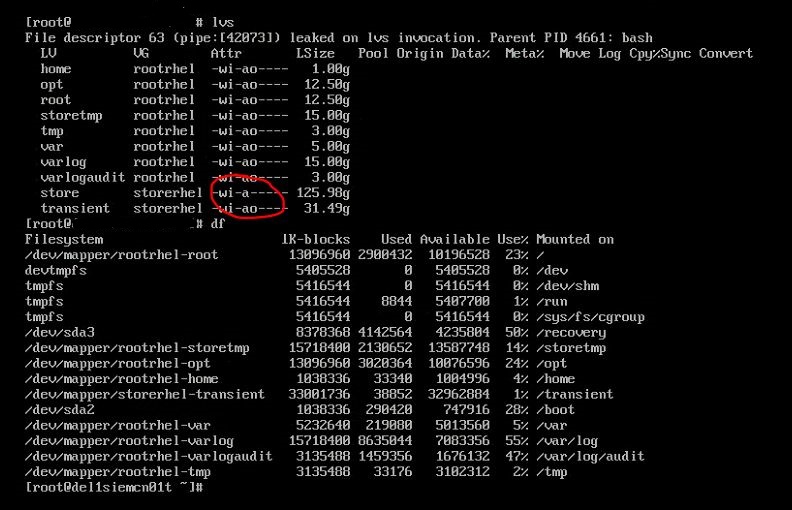
Despite that, when trying to mount this partition using the following commands:
mount /dev/mapper/storerhel-store /store
you will get an error saying that the structure needs cleaning.
Repair
After that, I ran xfs_repair. xfs_repair repairs corrupt or damaged XFS filesystems. The filesystem is specified using the device argument, which should be the device name of the disk partition or volume containing the filesystem. If given the name of a block device, xfs_repair will attempt to find the raw device associated with the specified block device and will use the raw device instead
Unfortunately, when I ran:
# xfs_repair /dev/mapper/storerhel-store
got an error in response. The only option was to run xfs_repair with the force option:
# xfs_repair -L /dev/mapper/storerhel-store
-L stands for Force Log Zeroing. Forces xfs_repair to zero the log even if it is dirty (has metadata changes). With this option, the filesystem will likely appear corrupt and may cause the loss of user files and/or data. Nevertheless, in this case, when I ran it,
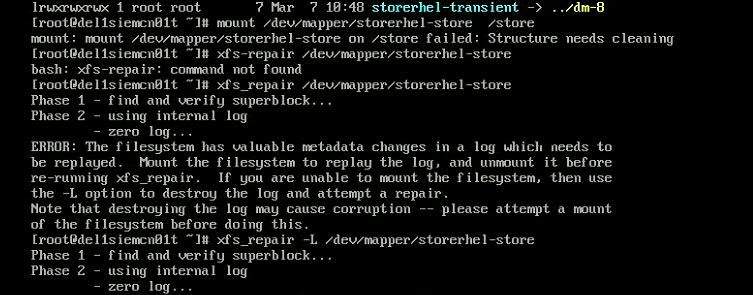
it resolved this issue. I could mount the recovered /store partition and then reboot the server.
This issue applies only to QRadar 7.3.x, which uses Red Hat 7 as the operating system.