

An open offense can be inactive in the Backend if no new events have occurred for at least 30 minutes. However, the end user (after opening the GUI) can see only two states (Open or Closed), while the backend has three.
In the backend (including the API), you can get three different states for each offense: Active, Dormant, Inactive.
Active offenses – When a rule triggers an offense, the offense is active. In this state, QRadar is waiting to evaluate new events or flows against the offense rule test. When QRadar evaluates new events, it resets the offense clock, keeping the offense active for another 30 minutes.
Dormant offenses – An offense becomes dormant (as shown in the screenshot above) if no new events or flows are added within 30 minutes, or if QRadar does not process any events within 4 hours. An offense remains dormant for 5 days. If an event is added while an offense is dormant, the five-day counter is reset. This offense is still open in the GUI.
Inactive offenses – An offense becomes inactive after 5 days in a dormant state. In the inactive state, new events that trigger the offense rule test do not contribute to the inactive offense. They are added to a new offense. Inactive offenses are removed after the offense retention period elapses. In the GUI, these are marked as Closed.
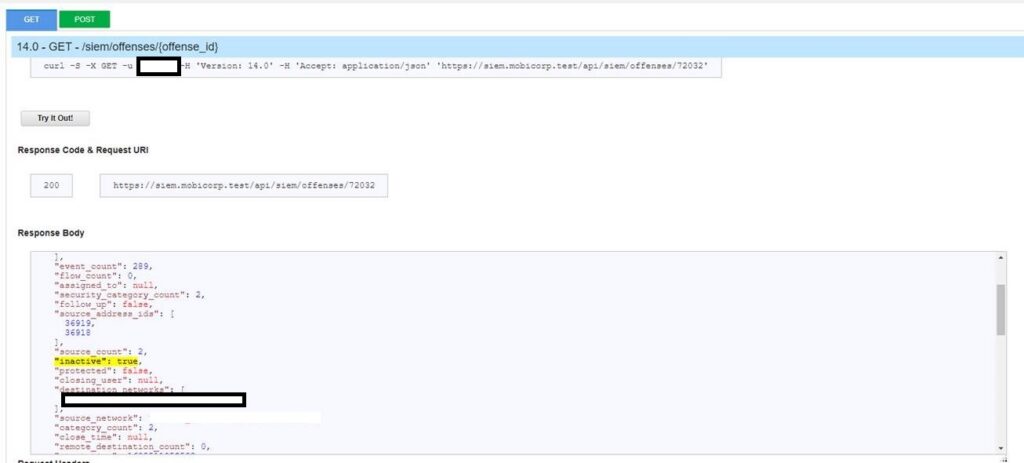
and finally
Closed offenses – Closed offenses are removed after the offense retention period elapses. If more events occur for a closed offense, a new offense is created.
The dormant state removes the offense from operational memory (after 30 minutes) to save resources. Nevertheless, while in the GUI, the offense remains in the OPEN state. For the same purpose, the system sets the offense to inactive in the backend (though for the first 5 days it is dormant, not fully inactive).
Once it is closed, the API field “close time” will be filled (during the dormant state, it is null).