
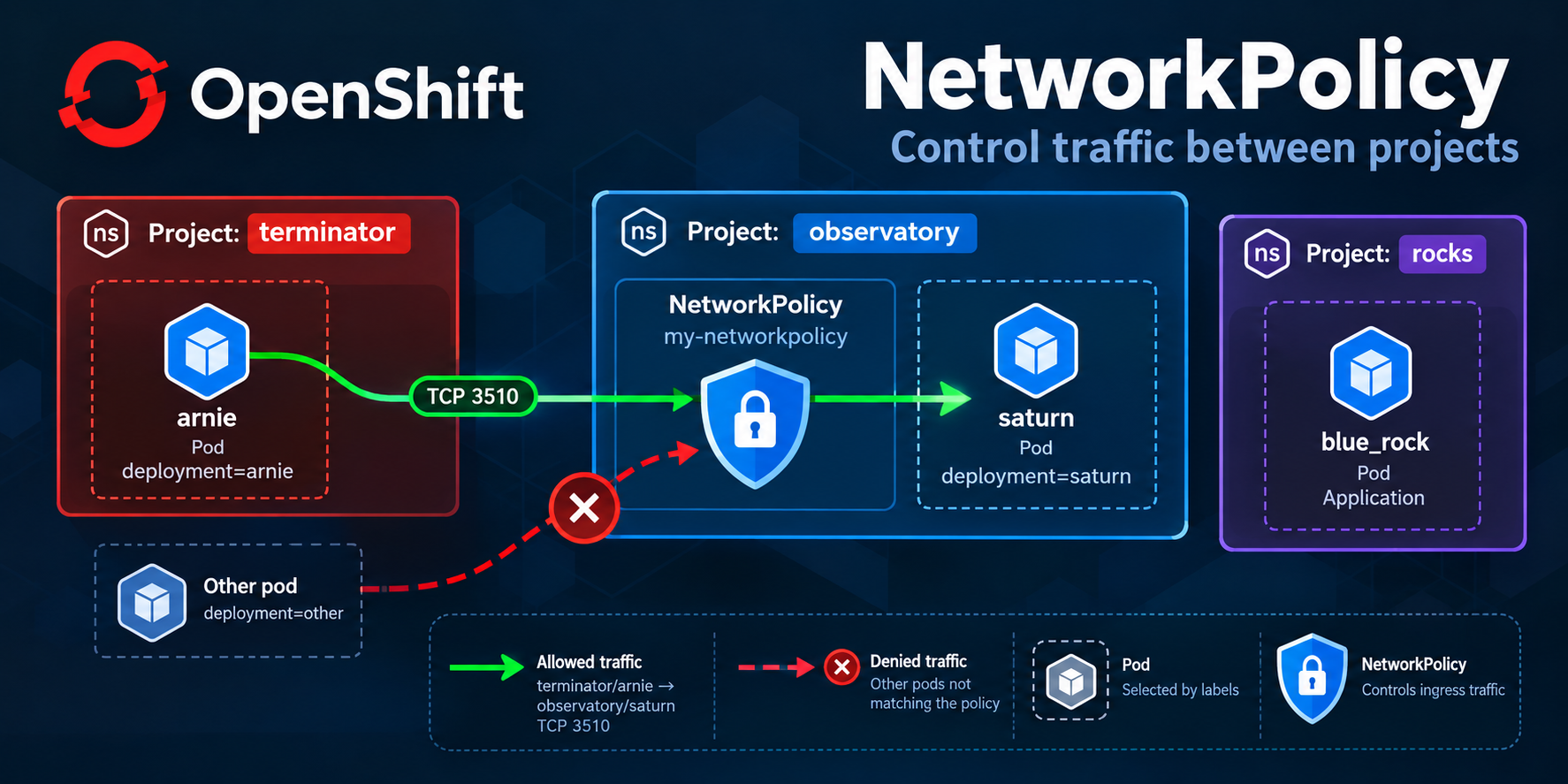
Securing Communication Between Projects
Network segmentation is essential to securing containerized applications. In Red Hat OpenShift, Kubernetes NetworkPolicy objects provide a declarative way to control which workloads can communicate, even across projects or cluster nodes.
Unlike traditional VLAN-based segmentation, NetworkPolicies use Kubernetes labels to identify workloads and define permitted traffic flows.
It is important not to confuse Kubernetes NetworkPolicies with Ingress resources. Although both manage network traffic, they serve different purposes. NetworkPolicies control which connections are permitted between workloads, while Ingress resources and OpenShift Routes expose applications through HTTP/HTTPS routing. For a more detailed comparison, see my article Key Differences Between Ingress and Routes in OpenShift.
Understanding NetworkPolicies
A Kubernetes NetworkPolicy defines which network connections are permitted to and from selected pods.
A policy can control:
- Ingress: Incoming connections to selected pods.
- Egress: Outgoing connections from selected pods.
- Source and destination: Using pod, namespace, and IP selectors.
- Protocols and ports: Such as TCP port 3510.
NetworkPolicies operate primarily at Layer 3 and Layer 4 of the networking stack. They do not inspect HTTP requests or application-level identities.
One important characteristic is that NetworkPolicies are namespace-scoped resources. A policy created in the observatory project controls pods within observatory, although its rules can allow traffic originating from other namespaces.
Default network behavior
Under the standard Kubernetes NetworkPolicy model, pods that are not selected by any relevant policy are non-isolated for that traffic direction.
Once an ingress NetworkPolicy selects a pod, incoming connections must be permitted by at least one applicable policy.
NetworkPolicies are additive. Creating a restrictive policy does not override traffic already allowed by another policy.
This behavior matters in environments where multiple administrators or application teams manage policies independently.
Exercise: Allow traffic between OpenShift projects
Consider the following exercise.
We have three OpenShift projects:
| Project | Application | Purpose |
|---|---|---|
rocks | blue_rock | Application deployment |
terminator | arnie | Source application |
observatory | saturn | Destination application |
Our objective is to:
- Deploy an application named
blue_rockin therocksproject without adding unnecessary configuration. - Verify that the application pod is running and produces valid output.
- Create a NetworkPolicy named
my_networkpolicyin theobservatoryproject. - Permit connections from pods labeled
deployment=arniein theterminatorproject to pods labeleddeployment=saturninobservatory. - Restrict this access to TCP port
3510.
The NetworkPolicy portion of this exercise is independent of the blue_rock deployment.
Traffic flow
The permitted connection should follow this path:
Project: terminator
+-----------------------------+
| Pod: arnie                  |
| Label: deployment=arnie     |
+--------------+--------------+
               |
               | TCP/3510
               v
Project: observatory
+-----------------------------+
| Pod: saturn                 |
| Label: deployment=saturn    |
|                             |
| NetworkPolicy:              |
| my_networkpolicy            |
+-----------------------------+

Project: rocks
+-----------------------------+
| Application: blue_rock      |
| Separate deployment task    |
+-----------------------------+
The goal is to enforce the principle of least privilege by allowing only the required source workloads and destination port.
Verify the existing OpenShift environment
Before making changes, authenticate to the cluster and inspect the existing projects.
oc whoami
oc get projects
Check whether the required namespaces exist:
oc get namespace rocks
oc get namespace terminator
oc get namespace observatory
If the exercise environment has already provisioned these projects, there is no need to recreate them.
Next, inspect the existing pods and their labels:
oc get pods -n terminator --show-labels
oc get pods -n observatory --show-labels
The exercise expects the source pod to have:
deployment: arnie
And the destination pod to have:
deployment: saturn
Important: NetworkPolicies evaluate actual pod labels, not application names, Deployment names, or Service names.
For example, a Deployment named arnie does not necessarily create pods with the label deployment=arnie.
Always verify the labels before constructing the policy.
Deploy the blue_rock application
The first part of the exercise requests an application named blue_rock in the rocks project.
Switch to the target project:
oc project rocks
Inspect the resources that may already exist:
oc get deployments,deployconfigs,pods,services
oc get imagestreams
oc get templates
If the exercise provides an application image, Git repository, template, or manifest, use that source to deploy the application.
For example, when an appropriate container image is supplied:
oc new-app <provided-image> \
  --name=blue-rock \
  -n rocks
This is a conditional example, not a complete deployment command: the exercise does not specify an image or application source.
Kubernetes resource names cannot contain underscores, so blue_rock cannot be used directly as a standard Deployment name. The valid resource name blue-rock can be used while preserving blue_rock as an application-specific label or configuration value if the exercise requires it.
Avoid adding environment variables, volumes, routes, or other configuration unless the application actually requires them.
Verify the deployment
oc get deployments -n rocks
oc get pods -n rocks
For a standard Deployment named blue-rock, wait for rollout completion:
oc rollout status deployment/blue-rock -n rocks
Inspect the logs:
oc logs deployment/blue-rock -n rocks
A healthy application should have a running, ready pod and produce the expected application output.
A pod showing Running does not, by itself, prove that the application is functioning correctly. Check readiness, logs, and application-specific behavior.
Create the NetworkPolicy
Now we can implement the main networking requirement.
Create a file named my_networkpolicy.yaml:
apiVersion: networking.k8s.io/v1
kind: NetworkPolicy
metadata:
  name: my_networkpolicy
  namespace: observatory
spec:
  podSelector:
    matchLabels:
      deployment: saturn
  policyTypes:
    - Ingress
  ingress:
    - from:
        - namespaceSelector:
            matchLabels:
              kubernetes.io/metadata.name: terminator
          podSelector:
            matchLabels:
              deployment: arnie
      ports:
        - protocol: TCP
          port: 3510
Important naming correction: Kubernetes NetworkPolicy names cannot contain underscores. The exercise’s requested name my_networkpolicy must therefore be normalized to my-networkpolicy before applying it.
Use this command to correct the file:
sed -i 's/name: my_networkpolicy/name: my-networkpolicy/' \
  my_networkpolicy.yaml
Apply the policy:
oc apply -f my_networkpolicy.yaml
Alternatively, save the YAML without the metadata.namespace field and specify the project explicitly:
oc apply -f my_networkpolicy.yaml -n observatory
Understanding the configuration
metadata
metadata:
  name: my-networkpolicy
  namespace: observatory
Defines the policy’s name and the namespace in which it operates.
podSelector
podSelector:
  matchLabels:
    deployment: saturn
Selects the destination pods to which the policy applies.
Only matching pods within the observatory namespace are selected.
namespaceSelector
namespaceSelector:
  matchLabels:
    kubernetes.io/metadata.name: terminator
Matches the namespace named terminator.
The standard kubernetes.io/metadata.name label is automatically assigned to namespaces in supported modern Kubernetes releases.
This eliminates the need to add a custom namespace label just to identify the namespace by name.
Source podSelector
podSelector:
  matchLabels:
    deployment: arnie
Restricts the allowed source to pods with the deployment=arnie label.
Because this selector appears in the same from item as the namespaceSelector, both conditions must match.
ports
ports:
  - protocol: TCP
    port: 3510
Permits TCP connections to destination port 3510.
The port refers to the destination pod’s network port, not necessarily the port exposed by an OpenShift Service.
For example, a Service might expose TCP port 80 and forward connections to container port 3510. The policy must allow the relevant destination port.
Understanding AND versus OR logic
One of the most important NetworkPolicy concepts is the difference between combining selectors in a single from item and placing them in separate items.
Correct: Logical AND
ingress:
  - from:
      - namespaceSelector:
          matchLabels:
            kubernetes.io/metadata.name: terminator
        podSelector:
          matchLabels:
            deployment: arnie
This allows only pods that meet both conditions:
- They belong to the
terminatornamespace. - They have the label
deployment=arnie.
Incorrect for this exercise: Logical OR
ingress:
  - from:
      - namespaceSelector:
          matchLabels:
            kubernetes.io/metadata.name: terminator
      - podSelector:
          matchLabels:
            deployment: arnie
This configuration means something very different.
It allows traffic from all pods in terminator OR pods labeled deployment=arnie in the policy’s own namespace (observatory).
A standalone podSelector inside a NetworkPolicy peer is scoped to the namespace containing the policy. It does not match pods with that label across every namespace.
This subtle YAML difference can accidentally create broader access than intended.
Verify the NetworkPolicy
Check that the policy was created:
oc get networkpolicy -n observatory
Inspect its configuration:
oc describe networkpolicy my-networkpolicy -n observatory
Retrieve the full YAML:
oc get networkpolicy my-networkpolicy \
  -n observatory -o yaml
Confirm that the policy selects deployment=saturn and permits ingress from deployment=arnie in terminator on TCP port 3510.
Test the connection
First, identify the destination Service and its port mapping:
oc get svc -n observatory
oc get endpointslices -n observatory
Check the Service details:
oc describe svc saturn -n observatory
Assuming a Service named saturn exists and exposes port 3510, test from the source pod:
oc exec -n terminator deployment/arnie -- \
  curl -v --connect-timeout 5 \
  http://saturn.observatory.svc.cluster.local:3510
This command assumes the source Deployment exists, its container has curl, and the destination serves HTTP.
For a non-HTTP TCP application, use an appropriate TCP client, such as nc, from a container where it is available:
nc -vz -w 5 saturn.observatory.svc.cluster.local 3510
Run that command from the arnie workload or an appropriately labeled test pod in the terminator namespace.
A successful connection verifies that traffic can reach the application. It does not necessarily prove that the NetworkPolicy is responsible for allowing it.
Negative testing
To verify isolation, repeat the connection test from a pod that does not match the permitted source.
For example, test from another pod in terminator without the deployment=arnie label.
The connection should fail if the destination is ingress-isolated and no other policy permits that source.
Also test a different destination port, provided the application actually listens on that port.
Remember that existing policies may allow additional traffic. NetworkPolicies do not have a deny-rule priority system that overrides other namespace NetworkPolicies.
Default-deny policies and isolation
A common approach to namespace security is to start with a default-deny ingress policy and add narrowly scoped allow rules.
Example:
apiVersion: networking.k8s.io/v1
kind: NetworkPolicy
metadata:
  name: default-deny-ingress
  namespace: observatory
spec:
  podSelector: {}
  policyTypes:
    - Ingress
  ingress: []
This policy selects all pods in observatory and provides no allowed ingress connections by itself.
However, any other ingress NetworkPolicy selecting those pods can still allow connections.
For our exercise, creating a default-deny policy is not necessary to express the requested access rule. It would also introduce additional configuration that could disrupt unrelated workloads.
In production, implement default-deny as part of a broader namespace security design, with explicitly permitted application, monitoring, and ingress-controller traffic.
Troubleshooting common NetworkPolicy issues
- The NetworkPolicy exists, but connections still fail:
Start by verifying the pod labels:
oc get pods -n observatory --show-labels
oc get pods -n terminator --show-labels
Check the namespace label:
oc get namespace terminator --show-labels
Confirm that the destination application is listening on the expected port.
For example, if the container includes ss:
oc exec -n observatory deployment/saturn -- \
  ss -lnt
Also inspect Services and their target ports:
oc get svc -n observatory -o yaml
Other possible causes include:
- An egress policy restricting the source pod.
- An AdminNetworkPolicy enforcing higher-priority restrictions.
- Incorrect DNS resolution or Service selectors.
- An application listening only on
127.0.0.1. - An incorrect Service
targetPort. - A failed or unready destination workload.
- Connections succeed from unexpected pods
Check whether additional policies select the destination:
oc get networkpolicy -n observatory
Inspect each relevant policy. Their allowed connections are combined.
Also verify that the unexpected source is not accidentally using the permitted labels.
A standard NetworkPolicy cannot override a connection that another applicable NetworkPolicy permits.
- DNS resolution fails
DNS is a separate networking dependency.
If an egress NetworkPolicy isolates the source pod, DNS traffic might also need to be explicitly allowed.
Use the cluster’s DNS configuration rather than assuming a particular DNS Service address.
What has changed recently?
The core Kubernetes NetworkPolicy concepts remain recognizable, but the surrounding OpenShift networking architecture has evolved.
Older OpenShift releases used OpenShift SDN and supported networking modes such as ovs-subnet, ovs-multitenant, and ovs-networkpolicy.
Modern OpenShift 4.x environments use OVN-Kubernetes as the networking foundation.
OVN-Kubernetes provides network segmentation and additional capabilities beyond the historical OpenShift SDN implementation.
This distinction matters because old OpenShift SDN installation parameters and plugin-specific configuration examples should not be copied directly into modern clusters.
Standard NetworkPolicy API
The supported Kubernetes NetworkPolicy API is:
apiVersion: networking.k8s.io/v1
The older Red Hat article Network Policy Objects in Action, published in 2017, demonstrates:
apiVersion: extensions/v1beta1
That legacy API is no longer appropriate for modern Kubernetes and OpenShift clusters.
Always use networking.k8s.io/v1 for standard NetworkPolicy resources.
Namespace identification
Older examples often require administrators to add custom namespace labels:
oc label namespace network-2 name=network-2
Modern Kubernetes namespaces include the standard label:
kubernetes.io/metadata.name: network-2
For selecting a specific namespace by name, this built-in label is generally preferable.
Custom namespace labels are still valuable when policies should apply to groups of namespaces, such as development, staging, or production environments.
Ingress Controller integration
When an application is exposed through an OpenShift Route or Kubernetes Ingress resource, traffic typically reaches the application through an Ingress Controller. A restrictive NetworkPolicy can block this traffic from reaching the destination pods unless it allows the appropriate source.
This illustrates how OpenShift Routes and Ingress resources work alongside NetworkPolicies: the former determine how external requests are routed to services, while the latter control whether the resulting connections are permitted.
network.openshift.io/policy-group: ingress
Current OVN-Kubernetes guidance uses:
policy-group.network.openshift.io/ingress: ""
For example:
apiVersion: networking.k8s.io/v1
kind: NetworkPolicy
metadata:
  name: allow-from-openshift-ingress
spec:
  podSelector: {}
  policyTypes:
    - Ingress
  ingress:
    - from:
        - namespaceSelector:
            matchLabels:
              policy-group.network.openshift.io/ingress: ""
This is a broad namespace-wide example that permits ingress-controller traffic to all pods. Do not add this blindly to a project that requires stricter application isolation.
OpenShift’s current documentation also discusses special considerations for host-networked traffic.
Do not manually assign OpenShift-reserved networking labels to custom projects.
AdminNetworkPolicy and BaselineAdminNetworkPolicy
Modern OVN-Kubernetes networking introduces additional administrative policy resources:
AdminNetworkPolicy (ANP) provides cluster administrators with higher-priority network controls that can allow, deny, or pass traffic for further evaluation.
BaselineAdminNetworkPolicy (BANP) supplies cluster-wide baseline rules that operate at a lower priority than standard namespace NetworkPolicies.
This extends the traditional namespace-level model.
For example, an organization may enforce cluster-wide restrictions while allowing development teams to manage more specific application policies.
When troubleshooting traffic, therefore, inspect more than standard NetworkPolicy objects.
Where supported, administrators can inspect these resources using:
oc get adminnetworkpolicies
oc get baselineadminnetworkpolicies
Permissions and feature availability depend on the cluster version and configuration.
Conclusion
Kubernetes NetworkPolicies provide a powerful mechanism for implementing microsegmentation in OpenShift.
In our exercise, the my-networkpolicy resource permits TCP traffic on port 3510 from pods labeled deployment=arnie in the terminator project to pods labeled deployment=saturn in observatory.
The essential configuration combines namespaceSelector and podSelector within the same source peer to enforce both restrictions.
Although OpenShift networking has evolved considerably since version 4.5, which I approached the Ex280 exam, the fundamental NetworkPolicy model remains relevant. Modern OVN-Kubernetes networking, standard namespace labels, and administrative network policies add capabilities to secure multitenant clusters.
Understanding these features helps administrators and developers build more secure, predictable, and maintainable network configurations.