
In early October 2025, IBM released IBM Security QRadar 7.5.0 patch UP14 to the public and made it available for download from the FixCentral repository. Customers can install it on IBM QRadar 7.5.0 UP11 or later. Read today about new, exciting features delivered with this patch.
Support for Tiered Storage
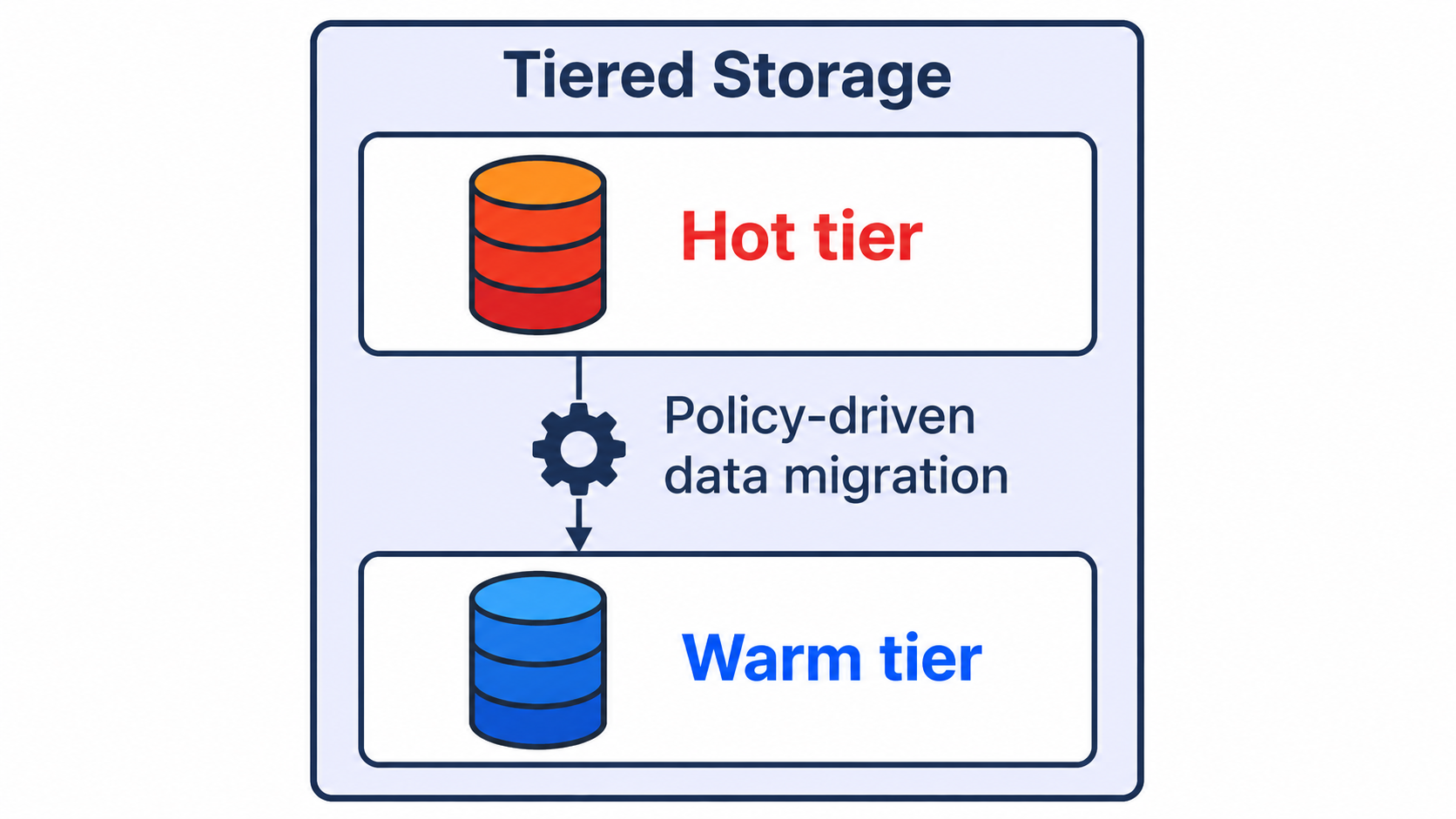
From UP14, Data Nodes are used differently when added to any processor (EP or the Console). Previously, each DN acted as a balancer, distributing incoming data evenly across available storage. Some data was saved to the Data Node and some to the Processor (if not set to the processing-only option). A new approach to managing QRadar (Ariel) data improves search performance and reduces potential costs by introducing a new concept of Hot and Warm Tiers
Each existing Data Node becomes Hot Storage, while Processors’ storage will be Warm Storage. This means each incoming fresh event is stored in the Hot tier (i.e., the Data Node) for fast access and automatically migrated to the Warm tier (so EP or Console) after a set period, based on a scheduled data migration policy. To set the data migration policy, two new icons are added in the Admin tab called Tiered Storage Event Migration Policy and Tiered Storage Flow Migration Policy. Tiered storage rebalancing is queued every 60 minutes when data expires from Hot storage and is moved to Warm storage.
These changes should improve performance and search efficiency by keeping recent data in one location, Data Node Hot Storage, rather than splitting it across two or more storage locations, improving speed and accessibility. By default, SOC analysts access recent data more frequently than older data, even though older data is still needed. Moving older data to cheaper, slower storage can also reduce storage costs.
An option was added to convert Data Nodes from their default Hot role to Warm if needed. However, it cannot be converted back to Hot, and the only way to proceed is to remove the existing Warm Data Node from the deployment, then re-add it; it will become Hot.
LVM support for appliances
In UP11, LVM support has been added to Software Installation, and UP14 Appliance installation is also supported. Please note that IBM does not support upgraded installations, so you need a fresh installation from the mentioned versions.
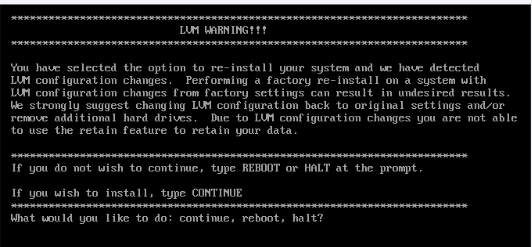
Another LVM feature added in this version is the Factory reinstall option. After updating the recovery ISO to UP14, if you need to reinstall QRadar, it can now recognize previously installed logical volumes and provide this information during the procedure, so you don’t need to recreate previously existing logical volumes and groups during reinstall.
Autonomous System Number (ASN) information
With UP14, QRadar QFlow automatically enriches network flow data with Autonomous System Number (ASN) information. The ASN field is now automatically populated for network flows, giving analysts additional context about the ownership and origin of IP traffic without requiring separate enrichment processes or manual lookups.
An Autonomous System Number (ASN) is a unique identifier assigned to an Autonomous System (AS), which represents a collection of IP networks and routers operated by a single organization under a common routing policy. ASNs are fundamental to internet routing and are used by the Border Gateway Protocol (BGP) to exchange routing information between autonomous systems. Through BGP, organizations advertise the IP address prefixes associated with their networks, allowing internet traffic to determine an appropriate path between different autonomous systems.
By automatically performing ASN lookups, QRadar can associate observed IP traffic with the network or Internet Service Provider (ISP) responsible for the corresponding address space. Instead of seeing only a source or destination IP address, analysts gain additional context that can help them understand where the traffic originates and which network organization is associated with it.
This enrichment can be particularly valuable during security investigations. Analysts can more quickly identify traffic associated with suspicious, unexpected, or high-risk networks and use ASN information alongside other flow properties when investigating potentially malicious activity. It also eliminates the need to perform ASN lookups manually or maintain a separate enrichment process solely for this purpose.
ASN information can also strengthen correlation and threat detection. Enriched flow metadata can be incorporated into searches, analytics, reporting, and detection logic, adding another attribute to distinguish expected network activity from potentially suspicious traffic. When combined with threat intelligence and GeoIP information, ASN data can provide broader context around external communications and help analysts identify patterns involving particular hosting providers, ISPs, cloud networks, or other network operators.
Beyond threat detection, ASN enrichment can improve overall network visibility and support use cases such as traffic analysis, reporting, traffic engineering, capacity planning, and compliance investigations. For security teams, the main advantage is that this additional context is now available directly within QRadar flow data, reducing analyst effort while making QFlow records more useful during investigations.
Version history for rules
QRadar UP14 introduces Rule Versioning, providing greater visibility and control over changes made to custom rules. Instead of retaining only the current configuration, QRadar now preserves previous versions of a rule whenever it is modified. This lets administrators and analysts review a rule’s history and, when needed, restore an earlier version.
Previously, recovering from an unwanted rule modification could require manually recreating the previous configuration or relying on other records of how the rule had been configured. With Rule Versioning, the system automatically maintains historical copies. Users can see who changed a rule, what was changed, and when the modification occurred, making it considerably easier to understand how a rule has evolved over time.
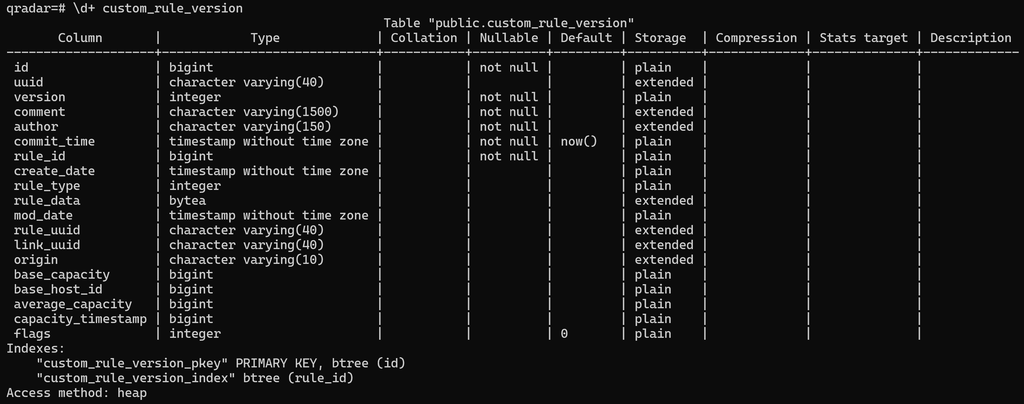
Whenever a supported rule create or edit operation takes place, QRadar stores the previous rule definition. This includes changes performed through the Rule Wizard UI as well as modifications made through the Rule API. The historical rule XML and associated version information are maintained in the custom_rule_version database table, which is structurally similar to the existing custom_rule table but contains additional fields required for version tracking.
QRadar also introduces a change log as part of the rule editing workflow. After modifying a rule, the author can provide a short message explaining the reason for the change. This provides useful context alongside the automatically collected version information and can help other administrators understand why a particular modification was introduced without requiring teams to maintain a separate change history.
Administrators can access historical versions directly from the rule management interface. From the main rules page, selecting Actions → Rule Versions opens the version history for the selected rule. From there, administrators can select an earlier version and view, compare, revert, or remove it. Importantly, reverting is not limited to the rule’s original configuration—a rule can be restored to an appropriate version from its available history.
If an invalid revert breaks a rule, QRadar generates a system notification identifying the affected rule. Administrators can then return to Rule Versioning and restore another known-good version. This behavior is expected to improve in UP15 to prevent or better handle unsafe version reverts. At this stage, Rule Versioning applies only to changes made through the UI. In the future, these will be possible to include in import/export via API or CMT.
Visibility for past AQL Queries and other features
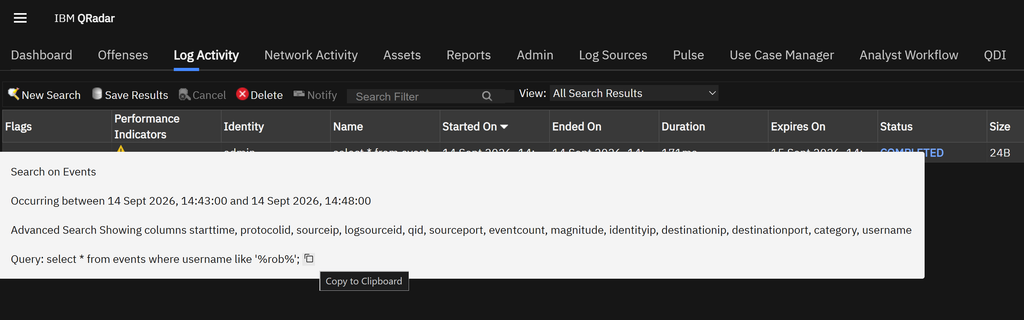
Previously, all AQL searches were labeled as “Custom AQL Query”. From UP14, the UI shows the initial part, and you can view the full AQL query by hovering over its name. You can also use the additional option Copy to Clipboard to quickly reuse the AQL.
From UP14, QRadar users can track only the most recent time an offense was assigned to a user, helping security teams respond faster and improve accuracy. You can also set magnitude thresholds when you create rule tests, which helps prioritize offenses.