
Understanding Routing Rules in IBM QRadar
As the volume of security data collected by IBM QRadar grows, efficiently controlling how that data is processed becomes increasingly important. Routing Rules provide a mechanism for managing incoming events and flows—whether they are stored in QRadar, forwarded to another destination, processed in a specific way, or simply dropped from the processing pipeline.
Understanding how Routing Rules work, and particularly the difference between Online and Offline processing, can help QRadar administrators optimise event processing and control how security data moves through their environment.
What are Routing Rules?
Routing Rules determine how selected events and flows are handled by QRadar. Administrators can use filters to identify specific data and then determine what QRadar should do with matching events or flows.
Depending on the selected mode and routing options, a Routing Rule can:
- forward events or flows to one or more configured forwarding destinations;
- drop events or flows before they are stored;
- bypass processing by the Custom Rules Engine (CRE);
- store events as Log Only (Exclude Analytics); or
- forward data while continuing to process it locally.
This makes Routing Rules useful not only for forwarding data to external systems, but also for controlling how data is processed within QRadar itself.
Routing Rules and the QRadar processing pipeline
To understand Routing Rules properly, it is important to understand where the rule is applied within the QRadar processing pipeline.
This is where the distinction between Online and Offline Routing Rules becomes particularly important.
At a simplified level, event processing can be represented as:
Log Source → Event Collector → Event Processor → CRE → Ariel
An Online Routing Rule operates on the Event Collector side, before the normal correlation and storage process is completed.
An Offline Routing Rule operates on the Event Processor after the data has already gone through normal processing and has been stored.
This difference determines which routing options are available and what effect the Routing Rule has on the data.
Online Routing Rules
Online mode applies to Event Collectors.
When an Online Routing Rule matches an event or flow, QRadar can make a routing decision before the data completes the normal processing pipeline.
Online mode therefore provides the greatest flexibility. Depending on the configuration, matching data can be:
- forwarded;
- dropped;
- forwarded and dropped;
- stored while bypassing correlation;
- forwarded while bypassing correlation; or
- for events, stored as Log Only.
Online Routing Rules are particularly useful when you need to make a decision about data before it reaches normal CRE processing and Ariel storage.
Offline Routing Rules
Offline mode applies to Event Processors.
Unlike Online mode, the event or flow has already undergone normal processing before the Offline Routing Rule forwards matching data.
The event or flow is processed by the CRE and stored in Ariel before the Routing Rule filters are applied for forwarding.
Because processing and storage have already occurred, options such as Drop, Bypass Correlation, and Log Only are not available in Offline mode.
This makes Offline Routing Rules primarily useful when the requirement is to forward selected data while retaining normal QRadar processing.
Online vs Offline Routing Rules
The fundamental differences can be summarised as follows:
| Feature | Online | Offline |
|---|---|---|
| Applied on | Event Collector | Event Processor |
| Forward events/flows | Yes | Yes |
| Drop | Yes | No |
| Bypass Correlation | Yes | No |
| Log Only | Events only | No |
| Data can avoid CRE processing | Yes | No |
| Data can avoid Ariel storage | Yes, with Drop | No |
Choosing between Online and Offline mode should therefore be based on when in the processing pipeline you need the routing decision to occur.
Routing options
QRadar provides four principal Routing Rule options: Forward, Drop, Bypass Correlation, and Log Only (Exclude Analytics).
Forward
The Forward option sends matching events or flows to the selected Forwarding Destination.
Unless Forward is combined with another routing option, the data continues through normal QRadar processing. It is stored in Ariel and processed by the CRE.
Forward can also be combined with Drop, Bypass Correlation, or Log Only when using an appropriate Online Routing Rule.
Drop
The Drop option prevents matching data from continuing through the QRadar processing pipeline.
Dropped data:
- is not stored in Ariel;
- is not processed by the CRE; and
- cannot subsequently be searched or recovered from QRadar.
Drop is available only with Online Routing Rules.
This option can be useful for data that has no security, operational, or compliance value and does not need to be retained.
Care should be taken when designing Drop filters. An overly broad filter can permanently discard useful security events.
Bypass Correlation
Bypass Correlation provides a less destructive alternative to Drop.
Matching events or flows are stored in Ariel, but they bypass processing by the Custom Rules Engine (CRE).
This means the data remains available for searches and other supported uses while avoiding normal real-time rule processing.
Bypass Correlation is available only in Online mode.
It can be particularly useful when data needs to be retained but does not need to participate in real-time correlation.
Log Only (Exclude Analytics)
For events, QRadar also provides the Log Only (Exclude Analytics) routing option.
Matching events are stored and marked as Log Only, but bypass CRE processing and real-time analytics.
Unlike Bypass Correlation, Log Only events are also excluded from historical correlation.
Log Only is available for events only and cannot be used with flows or Offline Routing Rules.
Combining forwarding with other routing options
Forwarding does not necessarily mean that QRadar must process the same data normally.
For example, an Online Routing Rule can use combinations such as:
Forward + Drop
The data is sent to the configured forwarding destination but is not stored locally and is not processed by the CRE.
Forward + Bypass Correlation
The data is forwarded and stored locally, but it bypasses CRE processing.
Forward + Log Only
The event is forwarded and stored locally as Log Only while bypassing analytics.
These combinations provide considerable flexibility when QRadar is being used as part of a larger security monitoring architecture.
Important consideration when using Forward + Drop
Special care should be taken when combining Forward and Drop.
With this configuration, QRadar forwards matching data but does not retain it locally.
Consider what happens if the forwarding destination becomes unavailable:
Event → QRadar → Forwarding failure → Event dropped locally
The event might not reach the remote destination, while at the same time QRadar does not retain a local copy.
The result can be permanent data loss.
For this reason, Forward + Drop should be used only when the implications of a forwarding or network failure are fully understood.
Multiple Routing Rules and precedence
An event or flow can potentially match more than one Routing Rule.
QRadar does not simply execute conflicting routing actions independently. When multiple rules apply, QRadar uses the routing option that has the least impact on normal processing—the safest option for retaining and processing the data.
For example, consider an event that matches two Routing Rules:
Rule 1 → Drop
Rule 2 → Bypass Correlation
QRadar does not drop the event. Instead, it bypasses CRE processing and stores the event.
This behaviour is important when troubleshooting a Routing Rule that appears not to be dropping or processing events as expected. Another Routing Rule might also be matching the same data.
Forwarding Destinations
Before a Routing Rule can forward data, an appropriate Forwarding Destination must be configured.
Forwarding Destinations are managed separately from Routing Rules under:
Admin → System Configuration → Forwarding Destinations
A destination defines where QRadar sends the forwarded data and how that data is transmitted.
Creating a Forwarding Destination by itself does not cause QRadar to start sending events. A Routing Rule or another supported forwarding mechanism must reference that destination.
This separation makes it possible to reuse the same destination with different Routing Rules and filtering criteria.
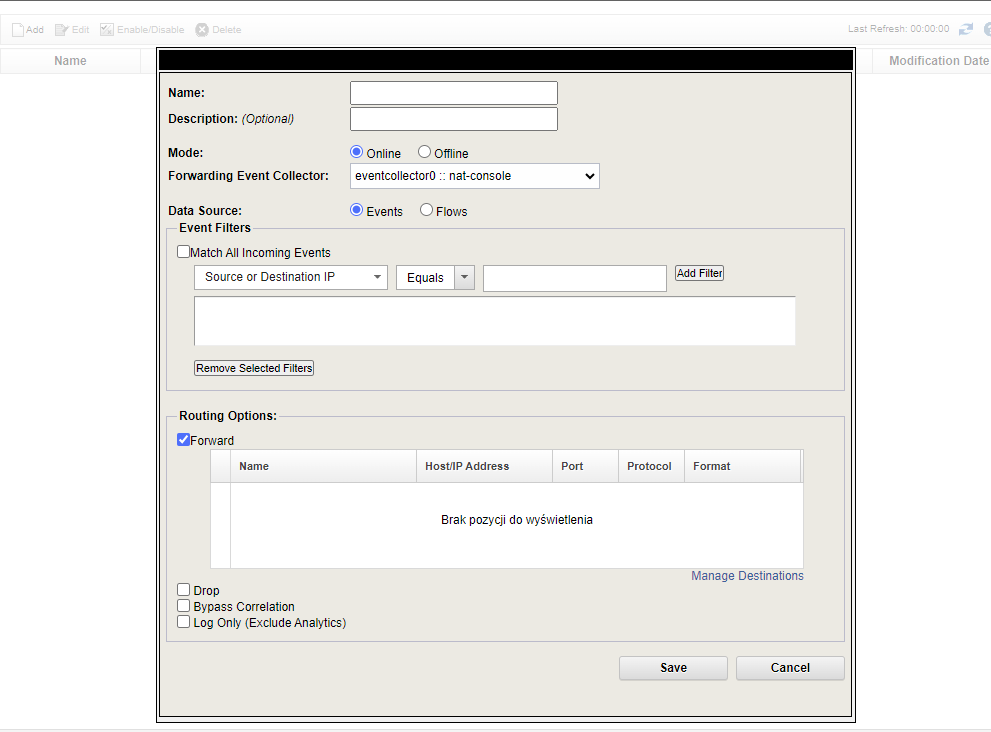
Creating a Routing Rule
Routing Rules are configured from the QRadar Admin interface:
Admin → System Configuration → Routing Rules
Click Add to create a new Routing Rule.
The general configuration process is:
- Enter a meaningful Name and Description for the rule.
- Select Online or Offline mode.
- Select the Event Collector or Event Processor on which the rule applies.
- Select Events or Flows as the Data Source.
- Define filters identifying the data that should match the Routing Rule.
- Select the required routing option.
- If forwarding data, select the appropriate Forwarding Destination.
- Save the Routing Rule.
The available options change depending on whether Online or Offline mode is selected and whether the data source consists of events or flows.
Filtering events and flows
Filters determine which events or flows are affected by a Routing Rule.
This is one of the most important parts of the configuration, particularly when using Drop.
A Routing Rule might, for example, target data based on:
- a particular log source;
- log source type;
- event properties;
- source or destination information;
- QID or event category; or
- other properties exposed by the Routing Rule filters.
When designing a Drop rule, it is good practice to make the filter as specific as possible and verify the matching data before enabling the destructive action.
For example, rather than relying solely on a broad payload condition, first restrict the rule to the relevant log source or log source type and then apply more specific criteria.
Routing Rules and EPS licensing
Routing Rules can also affect QRadar licence consumption.
Current QRadar behaviour credits events that are dropped by a Routing Rule back 100% to the licence. Events classified as Log Only (Exclude Analytics) are also credited back to the licence.
This distinction is important because older QRadar documentation and training material can contain different descriptions of how dropped events affect EPS licensing.
However, Routing Rules should not be designed solely as a mechanism for reducing EPS consumption. Before dropping or excluding events from analytics, administrators should determine whether the data has security, forensic, operational, or compliance value.
Practical use cases
Routing Rules can solve several common QRadar architecture and data-management requirements.
Removing unwanted data
Some log sources generate high volumes of events that provide little or no security value.
An Online Routing Rule can identify those events and drop them before they are stored and correlated.
Retaining data without real-time correlation
Sometimes events need to remain searchable but do not need to participate in real-time CRE processing.
Depending on the requirement, Bypass Correlation or Log Only can be used instead of dropping the data completely.
Selective forwarding
An organisation might need to forward only a subset of QRadar events to another system.
Instead of forwarding everything, filters can identify the required events and send only matching data to the configured destination.
Forwarding without local storage
In architectures where QRadar acts as an intermediate collection or forwarding layer, Forward + Drop can send selected data to another destination without retaining it locally.
Because this configuration introduces the possibility of data loss if forwarding fails, it should be implemented carefully.
Troubleshooting Routing Rules
When a Routing Rule does not behave as expected, several areas should be checked.
First, verify the filters and confirm that the expected events or flows actually match them.
Next, check whether other Routing Rules match the same data. Routing Rule precedence can cause QRadar to select a safer processing option than the one expected.
For forwarding problems, verify that the Forwarding Destination is correctly configured and reachable from the QRadar appliance responsible for forwarding the data.
It is also important to verify whether the rule is configured as Online or Offline, since this determines which QRadar component processes the rule and which routing options are available.
Finally, when troubleshooting Drop rules, confirm that the data is not matching another Routing Rule whose action takes precedence.
Conclusion
Routing Rules provide QRadar administrators with granular control over how events and flows move through the processing pipeline.
The most important concept to understand is the difference between Online and Offline processing.
Online Routing Rules operate early enough in the pipeline to change how matching data is processed. They can forward data, prevent it from being stored, bypass correlation, or classify events as Log Only.
Offline Routing Rules operate after normal processing and storage, making them primarily suitable for forwarding already-processed data.
Understanding where a Routing Rule operates—and what happens to the data before and after that point—is essential when designing rules involving Drop, Bypass Correlation, or forwarding to external destinations.
Used carefully, Routing Rules can help reduce unnecessary processing, control data retention, support integrations with other systems, and make the overall QRadar event-processing architecture more efficient.