
Whenever you notice that no events or flows are visible on the interface, try restarting the services. Even if this process doesn’t work, it will generate log entries that can help resolve the issue.
There are three main services running in QRadar:
- Hostcontext
- Tomcat
- Hostservices
Each QRadar admin should know these first troubleshooting steps. Please note that the order of steps matters: stop hostcontext and tomcat first, then restart hostservices.
SSH to the QRadar console or the component that is not sending events and issue the following commands. If you see any errors during the process, contact support.
You can omit tomcat if you are restarting services on a component other than the console (tomcat runs only on the console).
For QRadar 7.2.8 and below
# service hostcontext stop
# service tomcat stop
# service hostservices stop
# service hostservices start
# service tomcat start
# service hostcontext start
For QRadar 7.3 and above
# systemctl stop hostcontext
# systemctl stop tomcat
# systemctl stop hostservices
# systemctl start hostservices
# systemctl start tomcat
# systemctl start hostcontext
The hostcontext process is the first step when restarting QRadar services. It is the primary process that runs on the console and each managed host, and controls all the core qradar processes.

If you can’t deploy changes to one of the components, then check if there is hostcontext running. You can use the following command to check hostcontext on each component at once:
# /opt/qradar/support/all_servers.sh -C "systemctl status hostcontext"
or for QRadar 7.2
# /opt/qradar/support/all_servers.sh -C "service hostcontext status"
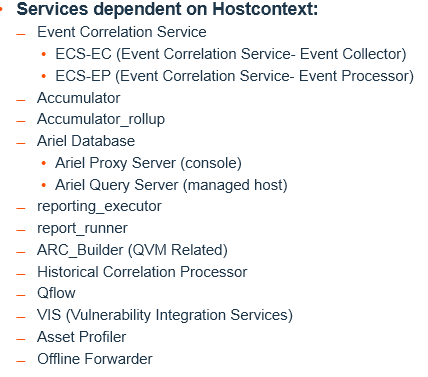
If you restart hostcontext, you also restart other services dependent on hostcontext. A list of some of them is below:
- Event Correlation Service
- ecs-ec (Event Correlation Service – Event Collector)
- ecs-ep (Event Correlation Service – Event Processor)
- Accumulator
- Accumlator_rollup
- Ariel Database
- ariel_proxy_server (running only on Console, and not on EP)
- ariel_query_server (running only on Managed Hosts, and not on Console)
- reporting_executor
- report_runner
- arc_builder (QVM only)
- Historical Correlation Processor
- QFlow
- VIS (Vulnerability Integration Services)
- Asset Profiler
- Offline Forwarder
- Tunnels
Depending on your configuration and number of Managed Hosts, each deployment can run a different set of hostcontext component processes. The exact listing of services running can be found with this command:
# grep COMPONENT /opt/qradar/conf/nva.hostcontext.conf
In version QRadar 7.2, you could restart hostcontext without restarting its child processes, using the command “hostcontext -q”. This command restarts the hostconext service, but it keeps data collection going because it does not restart ecs-ec. This should only be done if you believe there’s an issue with configservices, where the console is not able to update the remote host with the latest config, or if you believe the host isn’t responding to deploy requests.
For QRadar 7.3 and above (based on Linux systemd), a new architecture includes an additional service called ecs-ec-ingress (independent of hostcontext), which runs continuously and collects events. If it can’t be processed, it’s put aside in a persistent queue.
All sub-components/processes/services within Hostcontext can be restarted individually (without restarting hostcontext as a whole), like ecs-ec in the example below:
For QRadar versions prior to 7.3:
# service ecs-ec (stop, start, restart, status)

̶For QRadar versions 7.3 and post:
systemctl (stop, start, restart, status) ecs-ec
The Tomcat process is the next if you restart QRadar services. It runs the display engine (GUI) as an implementation of Java Servlet, JavaServer Pages, Java Expression Language, and Java WebSocket technologies.
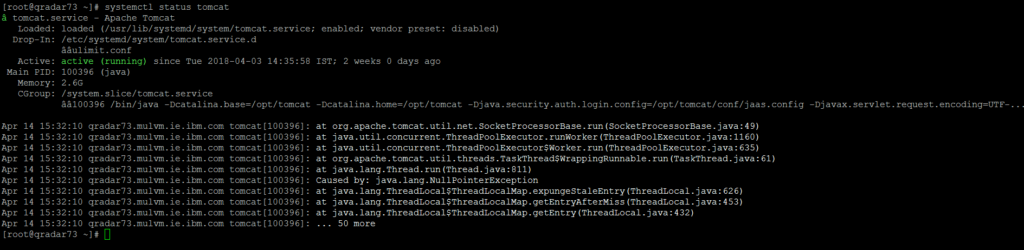
- These specifications are developed under the Java Community Process. Tomcat serves up our JSP webpages (console) as well as RPC and API calls. Restarting Tomcat also restarts the httpd service, but in many cases, restarting httpd can be enough to resolve the issue.
The hostservices is a Java process that runs as an ongoing daemon. It tracks two other running processes: IMQ and PostgreSQL. Postgres database stores configuration and reference data about log sources, the deployment, assets, offense data, and more. There are some variants of postgres service, which are running on specific appliances like postgres-qvm (QVM), postgres-rm (on QRM), or postgres-qf (on QRIF).